
ASP.NET iyzico Entegrasyonu
Bu blog bir yönden şahıs şirketinin devamı olarak da görülebilir.
Şahıs Şirketi(Home Ofis) Kurulumu (Günlük Güncellenecek) + KOSGEB ile ilgili bir kaç bilgi – Part 1
IyzicoDeneme Adında proje açıyoruz:
File -> New Project -> Web -> ASP.NET Web Application (.NET Framework)
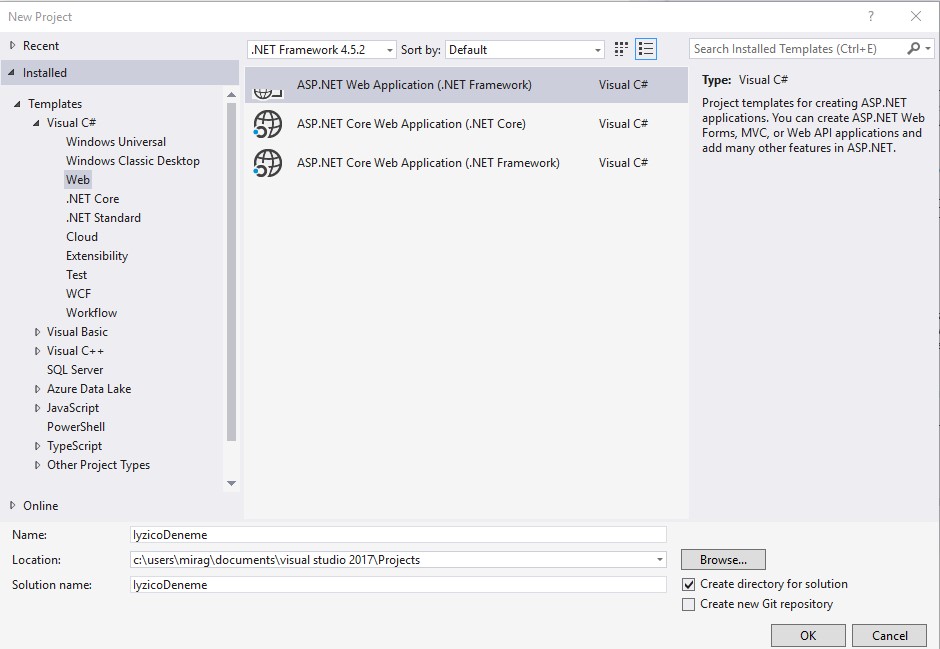
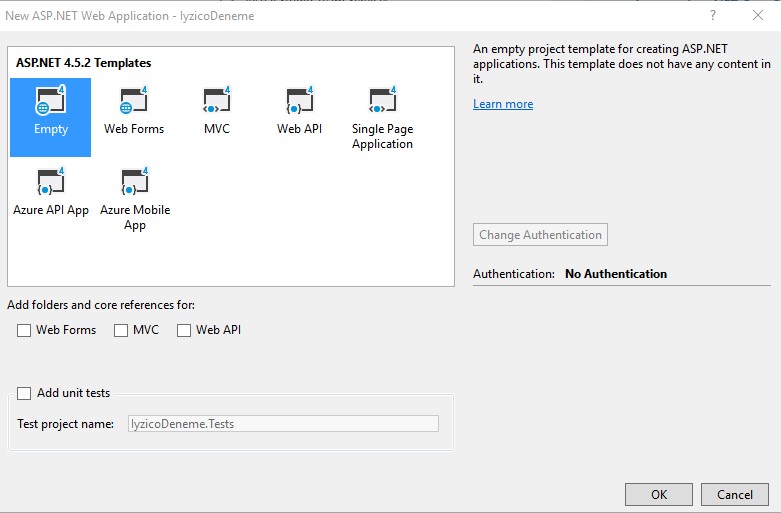
Empty -> OK
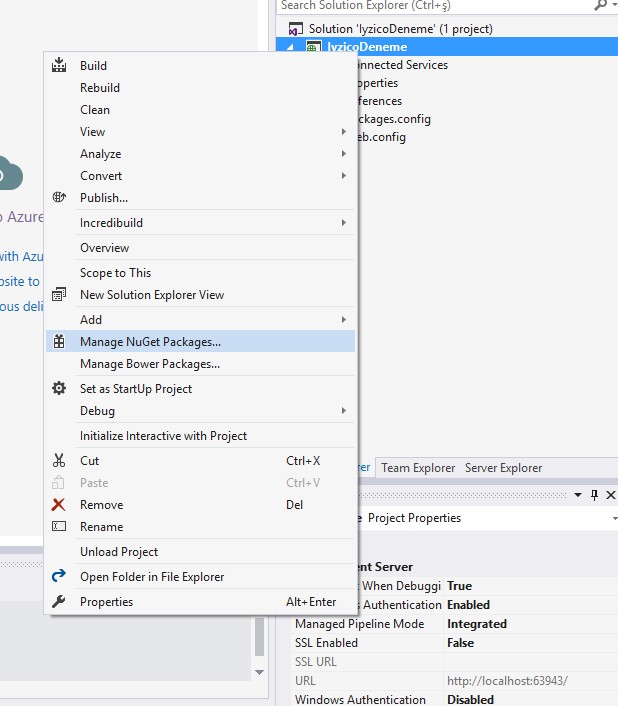
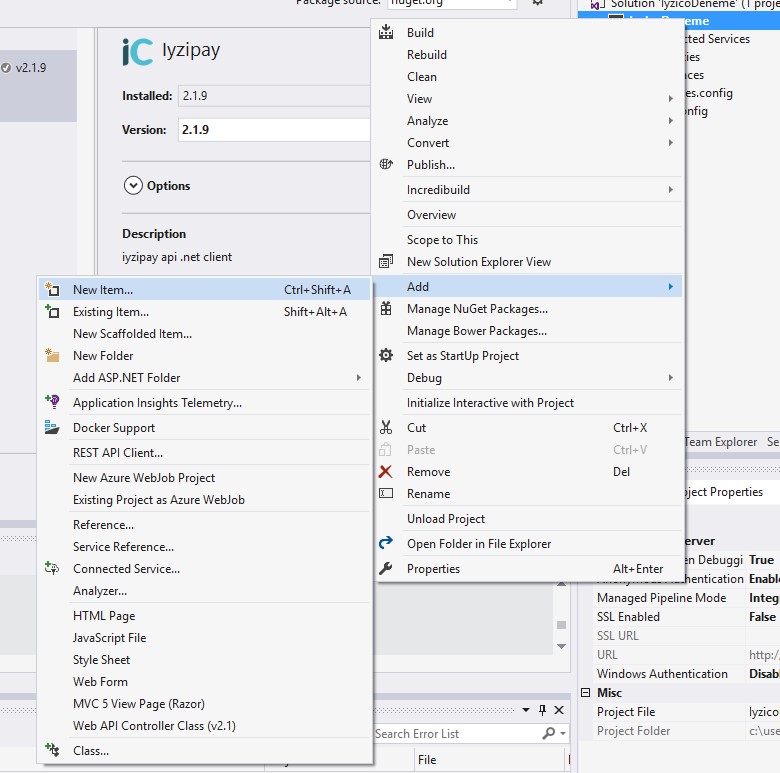
Proje Sağ tıklayıp Manage Nuget:
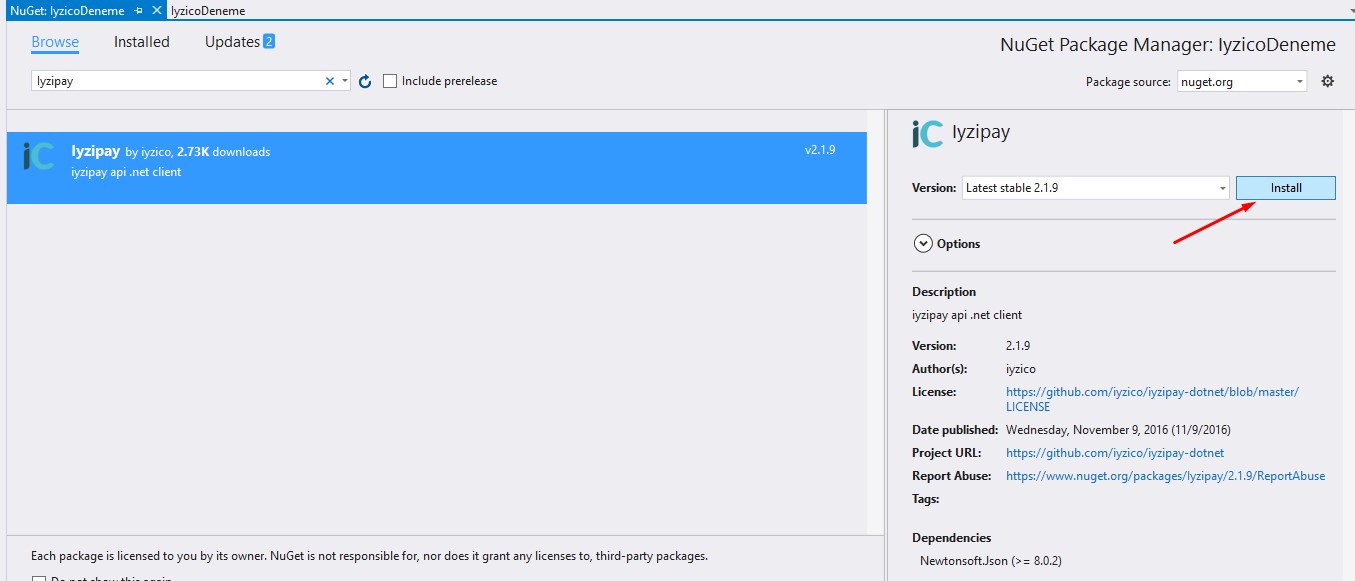
Iyzipay yazıyoruz. Ve Install.
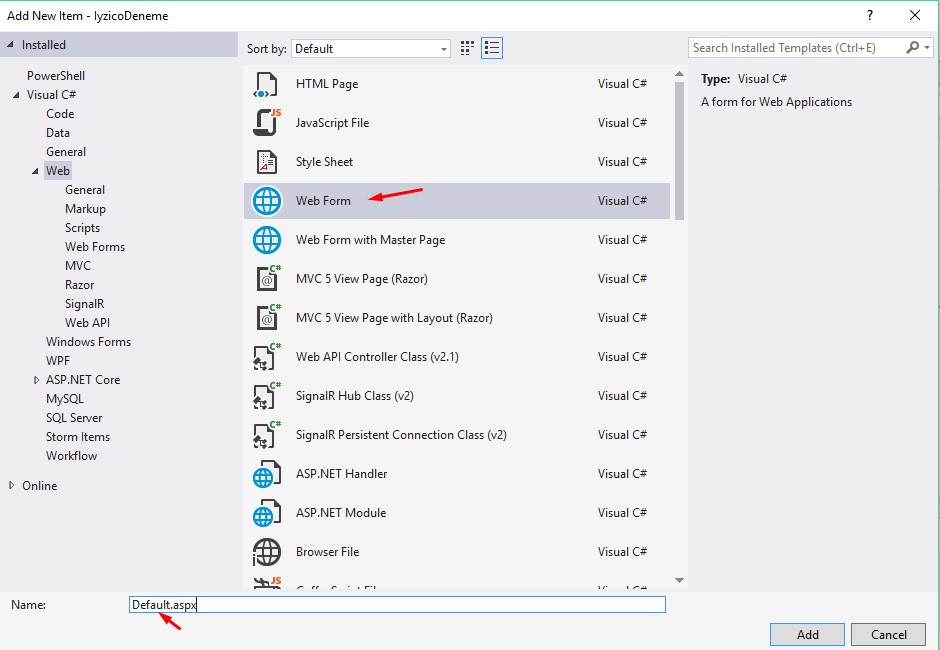
Proje sağ tık Add New Item Web Form Default.aspx
Bir buton ekleyip 2 kez tıklayarak Click eventini oluşturup alttaki linkteki kodları yapıştırıyoruz.
https://dev.iyzipay.com/tr/odeme-formu/odeme-formu-baslatma#response
Api anahtarını kaydolduktan sonra veriyor. Siteye kaydolurken mail kısmına @hotmail felan olmuyor. Ücretsiz olmayan bir mail olmalı. @sirketadi.com gibi.
https://github.com/iyzico/iyzipay-dotnet
Github da Options olan kodu alın sadece onu üstteki odeme formu baslatma da ki kodların üstüne yapıştırıyoruz.
https://paste.laravel.io/e8gGM
Bu şekilde olucak yani:
Laravel'e girmeyebilir diye buraya da atıyorum:
Options options = new Options();
options.ApiKey = "apikey";
options.SecretKey = "secretkey";
options.BaseUrl = "https://sandbox-api.iyzipay.com";
CreateCheckoutFormInitializeRequest request = new CreateCheckoutFormInitializeRequest();
request.Locale = Locale.TR.ToString();
request.ConversationId = "123456789";
request.Price = "1";
request.PaidPrice = "1.2";
request.Currency = Currency.TRY.ToString();
request.BasketId = "B67832";
request.PaymentGroup = PaymentGroup.PRODUCT.ToString();
request.CallbackUrl = "https://www.merchant.com/callback";
List<int> enabledInstallments = new List<int>();
enabledInstallments.Add(2);
enabledInstallments.Add(3);
enabledInstallments.Add(6);
enabledInstallments.Add(9);
request.EnabledInstallments = enabledInstallments;
Buyer buyer = new Buyer();
buyer.Id = "BY789";
buyer.Name = "John";
buyer.Surname = "Doe";
buyer.GsmNumber = "+905350000000";
buyer.Email = "[email protected]";
buyer.IdentityNumber = "74300864791";
buyer.LastLoginDate = "2015-10-05 12:43:35";
buyer.RegistrationDate = "2013-04-21 15:12:09";
buyer.RegistrationAddress = "Nidakule Göztepe, Merdivenköy Mah. Bora Sok. No:1";
buyer.Ip = "85.34.78.112";
buyer.City = "Istanbul";
buyer.Country = "Turkey";
buyer.ZipCode = "34732";
request.Buyer = buyer;
Address shippingAddress = new Address();
shippingAddress.ContactName = "Jane Doe";
shippingAddress.City = "Istanbul";
shippingAddress.Country = "Turkey";
shippingAddress.Description = "Nidakule Göztepe, Merdivenköy Mah. Bora Sok. No:1";
shippingAddress.ZipCode = "34742";
request.ShippingAddress = shippingAddress;
Address billingAddress = new Address();
billingAddress.ContactName = "Jane Doe";
billingAddress.City = "Istanbul";
billingAddress.Country = "Turkey";
billingAddress.Description = "Nidakule Göztepe, Merdivenköy Mah. Bora Sok. No:1";
billingAddress.ZipCode = "34742";
request.BillingAddress = billingAddress;
List<BasketItem> basketItems = new List<BasketItem>();
BasketItem firstBasketItem = new BasketItem();
firstBasketItem.Id = "BI101";
firstBasketItem.Name = "Binocular";
firstBasketItem.Category1 = "Collectibles";
firstBasketItem.Category2 = "Accessories";
firstBasketItem.ItemType = BasketItemType.PHYSICAL.ToString();
firstBasketItem.Price = "0.3";
basketItems.Add(firstBasketItem);
BasketItem secondBasketItem = new BasketItem();
secondBasketItem.Id = "BI102";
secondBasketItem.Name = "Game code";
secondBasketItem.Category1 = "Game";
secondBasketItem.Category2 = "Online Game Items";
secondBasketItem.ItemType = BasketItemType.VIRTUAL.ToString();
secondBasketItem.Price = "0.5";
basketItems.Add(secondBasketItem);
BasketItem thirdBasketItem = new BasketItem();
thirdBasketItem.Id = "BI103";
thirdBasketItem.Name = "Usb";
thirdBasketItem.Category1 = "Electronics";
thirdBasketItem.Category2 = "Usb / Cable";
thirdBasketItem.ItemType = BasketItemType.PHYSICAL.ToString();
thirdBasketItem.Price = "0.2";
basketItems.Add(thirdBasketItem);
request.BasketItems = basketItems;
CheckoutFormInitialize checkoutFormInitialize = CheckoutFormInitialize.Create(request, options);
Üstteki ödeme formu linkindeki popup olan div i de html kodlarına ekledim.
<div id="iyzipay-checkout-form" class="popup"></div>
Orası da böyle oldu yani:
https://paste.laravel.io/7WVNn
<html xmlns="http://www.w3.org/1999/xhtml">
<head runat="server">
<title></title>
</head>
<body>
<form id="form1" runat="server">
<div>
<asp:Button ID="Button1" runat="server" Text="Button" OnClick="Button1_Click" />
<div id="iyzipay-checkout-form" class="popup"></div>
</div>
</form>
</body>
</html>
request de ki CallbackUrl yi şu şekilde değiştirdim yönlendiği sayfaya geri dönsün diye:
request.CallbackUrl = HttpContext.Current.Request.Url.AbsoluteUri;
https://stackoverflow.com/questions/593709/how-to-get-the-url-of-the-current-page-in-c-sharp
Alttaki kodları da ekledim.
public static String odendiMi = "";
protected void Page_Load(object sender, EventArgs e)
{
if (odendiMi.Equals("success", StringComparison.OrdinalIgnoreCase))
{
ClientScript.RegisterClientScriptBlock(this.GetType(), "alert", "alert('İşleminiz başarıyla gerçekleşti.')", true);
odendiMi = "";
}
}
Buton1 Click in en altında da bunları:
ClientScript.RegisterClientScriptBlock(this.GetType(), "alert", checkoutFormInitialize.CheckoutFormContent);
odendiMi = checkoutFormInitialize.Status;
Sonuç olarak tüm kodlar:
https://paste.laravel.io/3XWp0
https://github.com/miragessee/IyzicoDeneme-ASP.NET
Test kartlar:
https://dev.iyzipay.com/tr/test-kartlari
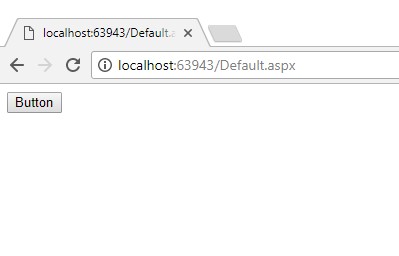
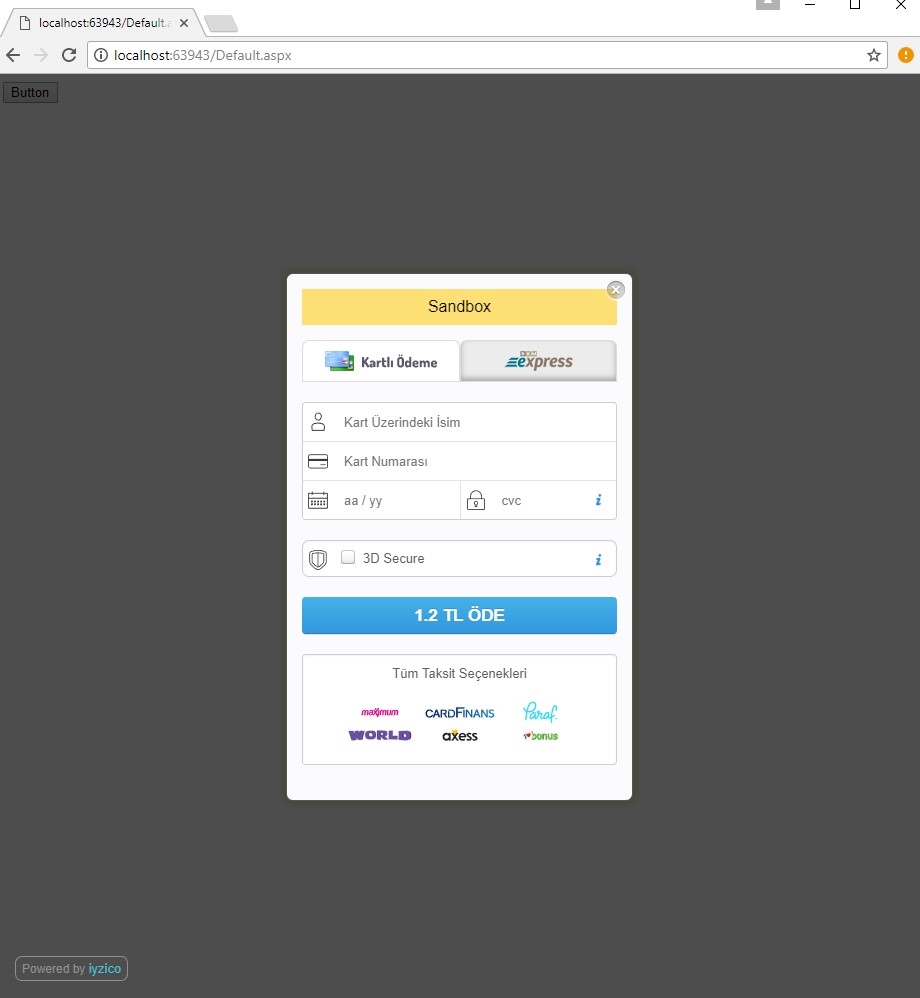
Çalışma Görüntüleri:
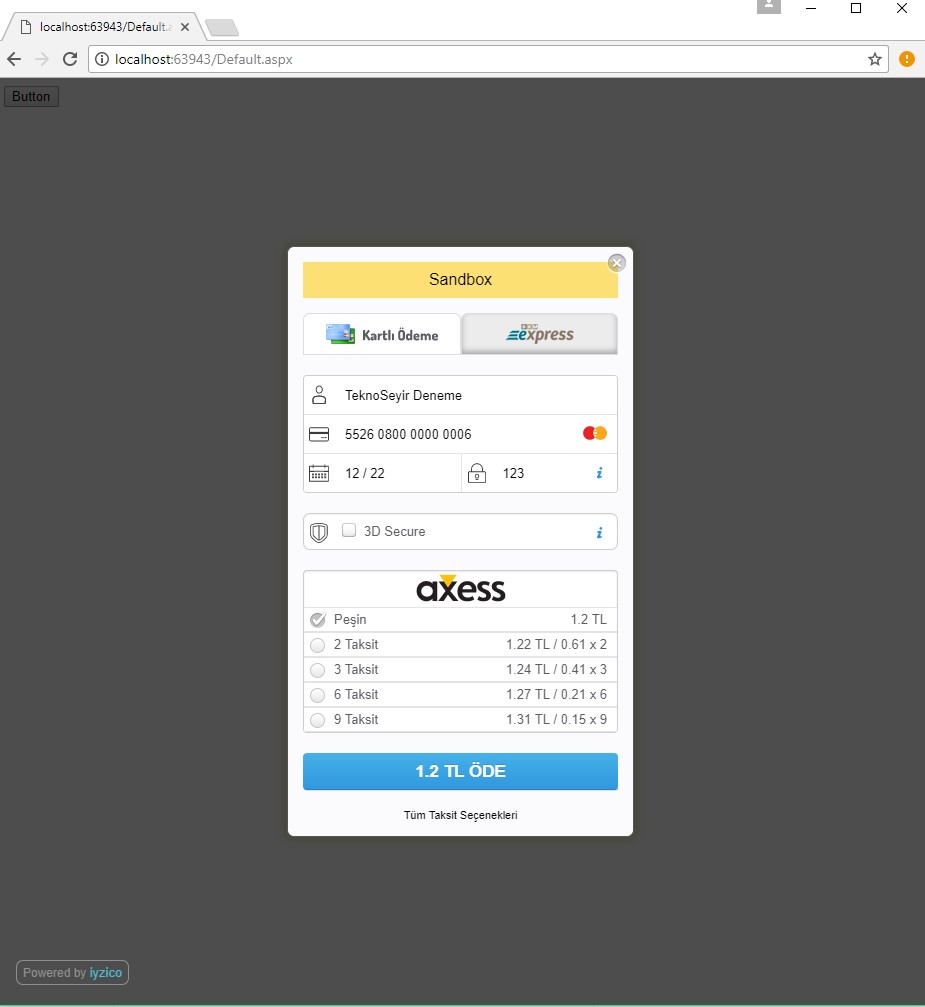
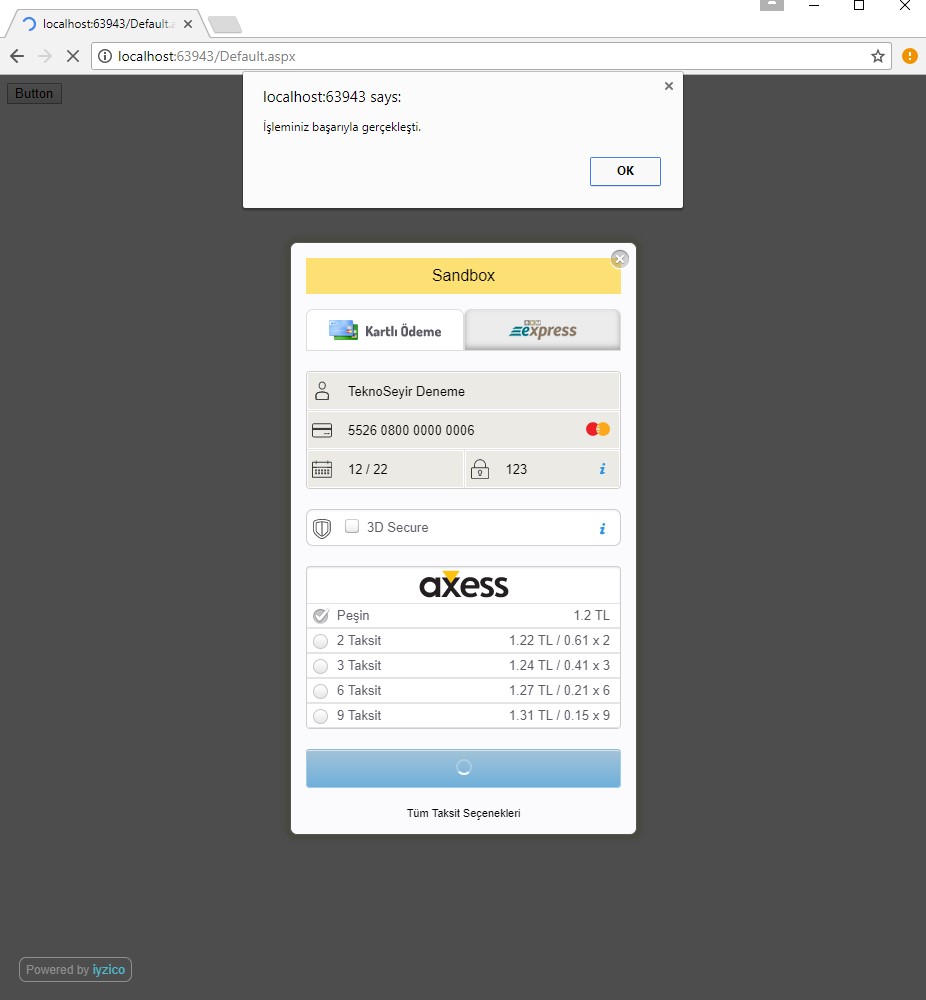
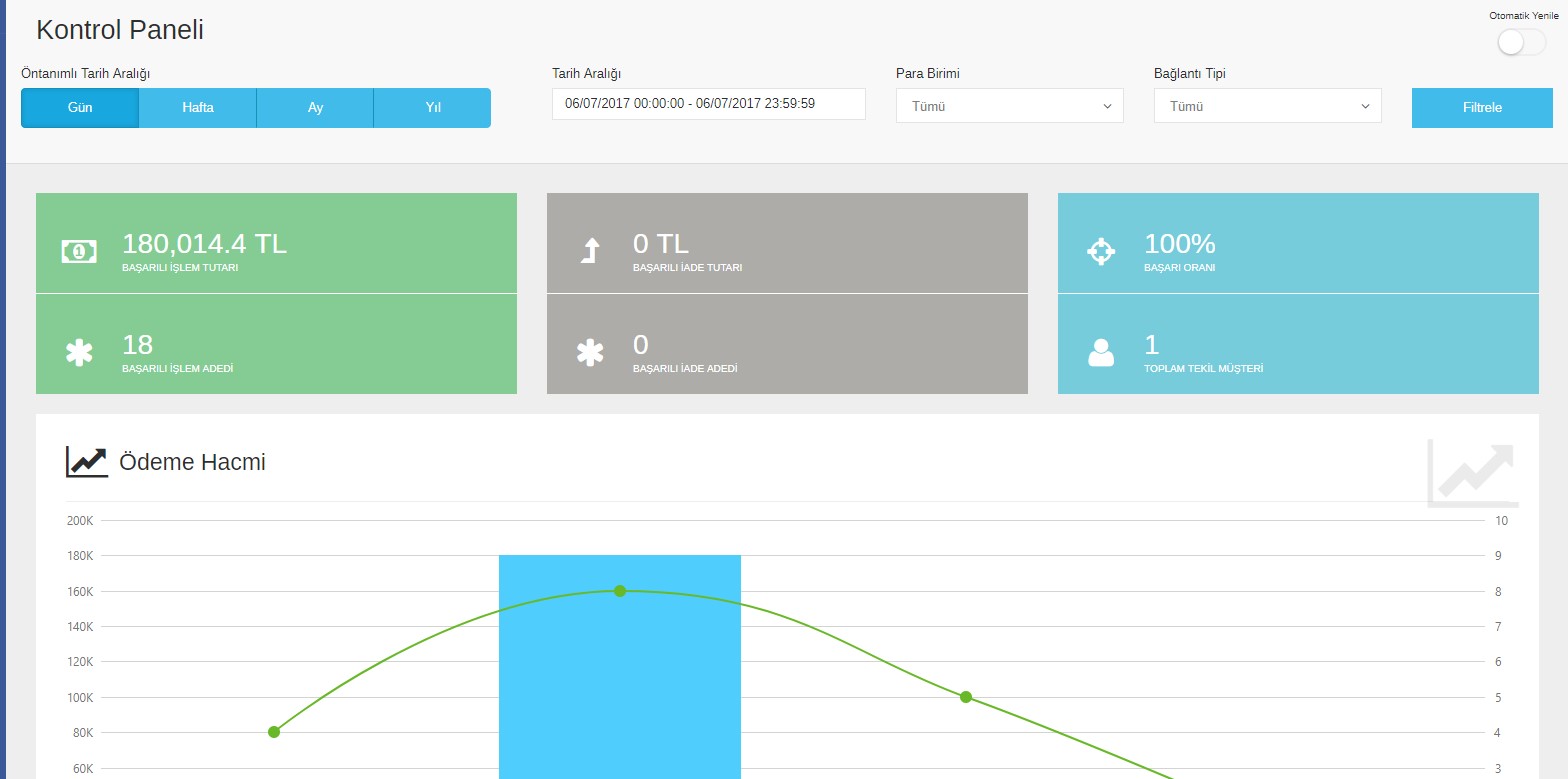
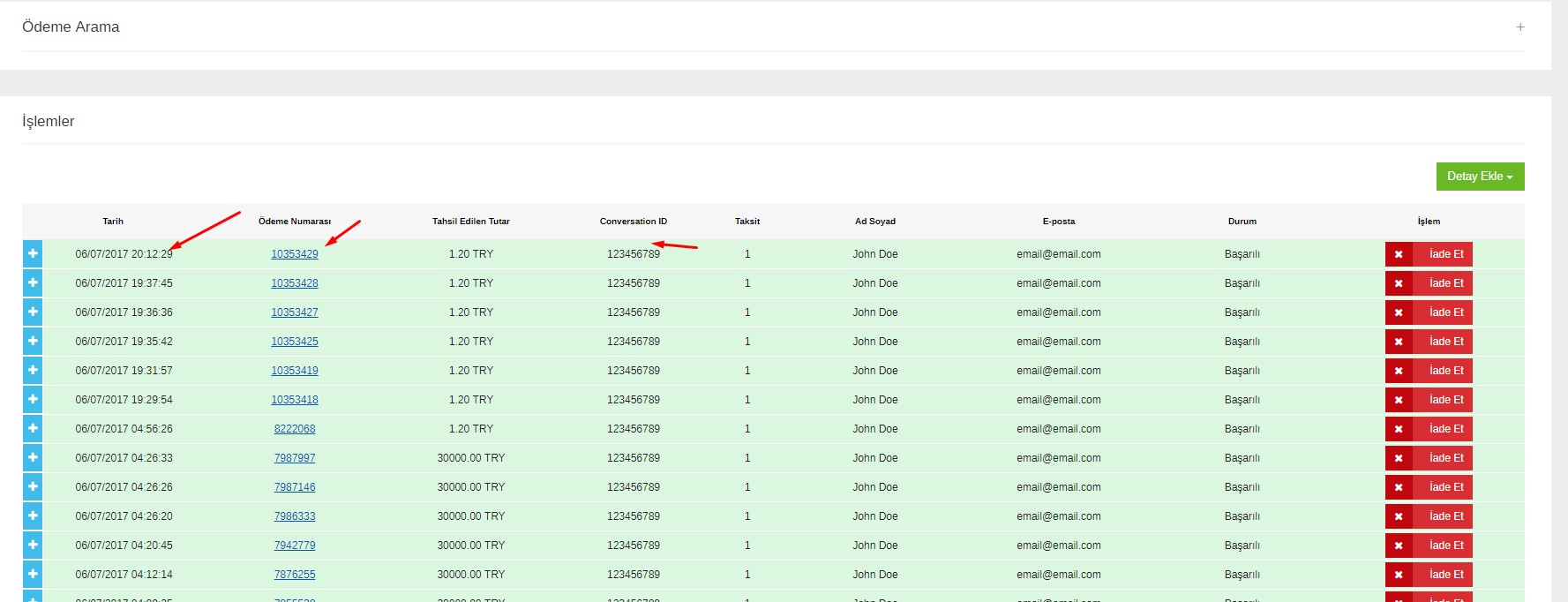
Iyzico Kontrol Panelinden Görüntüler:
Not: Test Ortamı olduğu için ben 30.000 TL lik felan şeyler denediğimden bu kadar fazla. En azından Test Ortamında zenginiz.
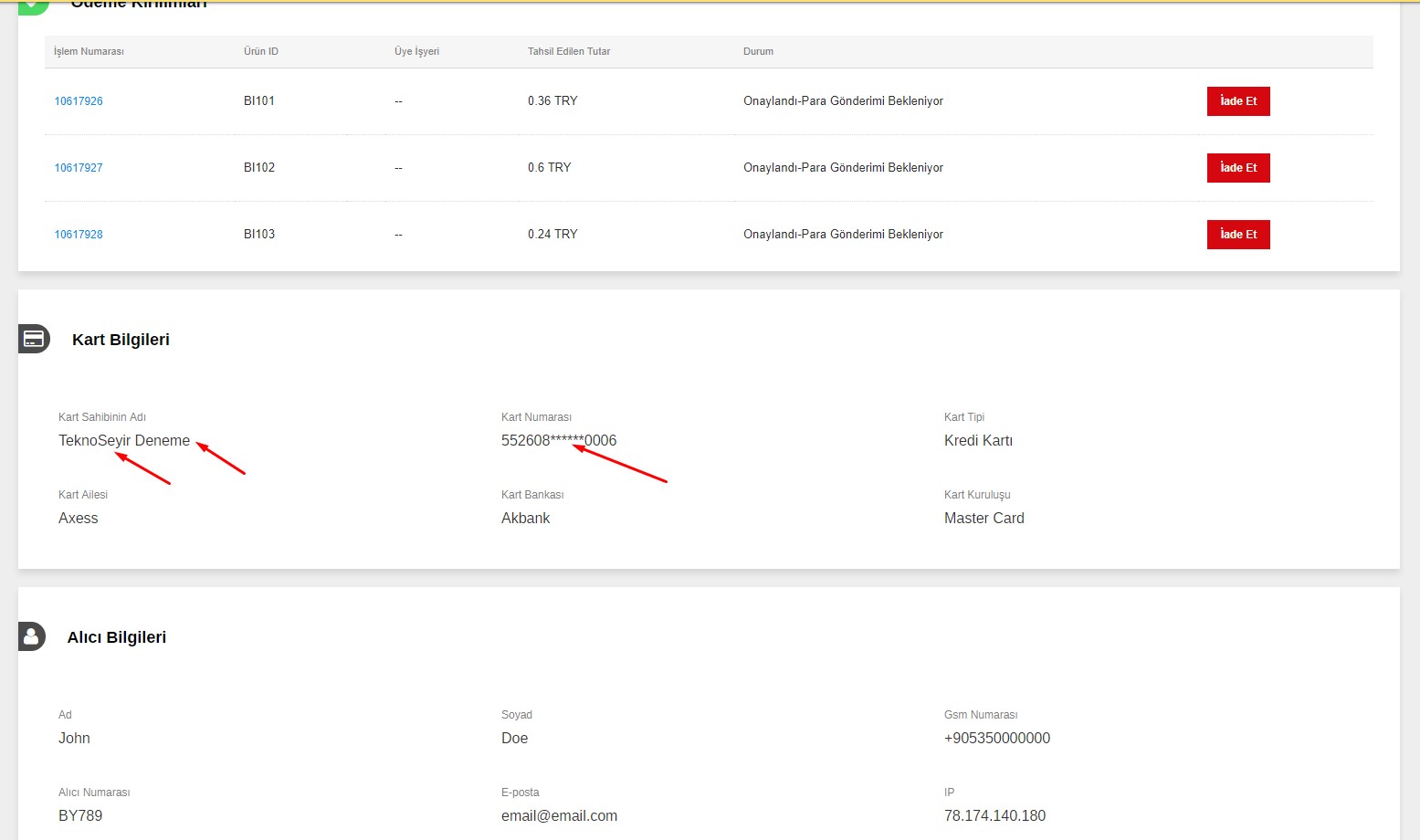
Bu blog da bu kadar. Nette ASP ile Entegrasyonu ile ilgili pek bir bilgi bulunmuyor. Kendi sitelerinde ki örneklerde yeterli değil. Bende yeni kullanmaya başladım. Sorunu olan yorum olarak yazabilir.
Not: Bi yere yanlışlıkla benim api key'i yazdıysam söyleyin kullanmayın 😀 😀
-----------------------------------------------------------------------
Güncelleme:
@brkogtn den alıntıdır.
ben sorunu buldum öncelikle bunu ekleyin
public void GetResult(string token)
{
options = new Options();
options.ApiKey = “api keyiniz”;
options.SecretKey = “secret keyiniz”;
options.BaseUrl = “https://sandbox-api.iyzipay.com&#8221;;
RetrieveCheckoutFormRequest request = new RetrieveCheckoutFormRequest();
request.ConversationId = “123456789”;
request.Token = token;
CheckoutForm checkoutForm = CheckoutForm.Retrieve(request, options);
if (checkoutForm.PaymentStatus.Contains(“SUCCESS”))
{
}
}
ClientScript.RegisterClientScriptBlock(this.GetType(), “”, checkoutFormInitialize.CheckoutFormContent);
token = checkoutFormInitialize.Token; —- bu satir ile tokeni alin






Web Form zaten vardı sıkıntı olmuyor, Mvc paylaşırsan onu bulamamıştım birileri ararsa çıkacaktır 🙂 ben sonradan çözmüştüm ama makalesini yazmadık tabi 🙂
MVC bilmiyorum. Web Form nerde var hiç bi yerde bulamadım?
@miragessee yok mu? vardır diye öyle iddialı yazdım 😀 Mvc aradım bulmadım, söyledim dedim niye Mvc örnek yapmadınız diye bana Web Form örneği yolladılar 🙂 onun üzerinden bir şekilde çevirdim. Şurada işine yarar bir şeyler çıkar. https://github.com/iyzico/iyzipay-dotnet
@alikoprulu29 api bu web form değil ordaki kodlar dokümanda da var. Onu start deyip çalıştıramazsın. Dll projesi (mantığına benzer) gibi bi şey o. Aynı zamanda da kaynak kod.
@miragessee içeriği detaylı incelemedim ama o zaman bana direk e-posta gönderdiler. Aslında koymaları gerekiyor neden koymadılar anlamadım 🙂
@miragessee bu arada sıkıntı yok, emeğe saygı var 🙂 bol bol olması gereken bir şeyin olmaması ilginç geldi 🙂
Canlı Ortama Geçilince BaseURL:
options.BaseUrl = "https://api.iyzipay.com";
şeklinde değişince çalışıyor. Bu da sitenin hiç bir yerinde yok. Keylerin önünde sandbox- vardı Canlı Ortam keylerinde o sandbox yok demek ki BaseURL de bulunan sandbox da olmuyacak diyerek deneme yanılma ile buldum. 3 TL lik bi deneme yaptım bakalım ne zaman gelicek 😀
kod sorunsuz ancak odendi tarafında sorun var o success degeri pencere acildigi anda alınıyor zaten yani popup çıkan formun x ine basarsanizda odeme alindi bilgisi aliyorsunuz ve bide yeni buton cikiyor odeme formunu ac diye birşeyler eksik sorunu çözerseniz paylasirsaniz sevinirim
ben sorunu buldum öncelikle bunu ekleyin
public void GetResult(string token)
{
options = new Options();
options.ApiKey = "api keyiniz";
options.SecretKey = "secret keyiniz";
options.BaseUrl = "https://sandbox-api.iyzipay.com";
RetrieveCheckoutFormRequest request = new RetrieveCheckoutFormRequest();
request.ConversationId = "123456789";
request.Token = token;
CheckoutForm checkoutForm = CheckoutForm.Retrieve(request, options);
if (checkoutForm.PaymentStatus.Contains("SUCCESS"))
{
}
}
ClientScript.RegisterClientScriptBlock(this.GetType(), "", checkoutFormInitialize.CheckoutFormContent);
token = checkoutFormInitialize.Token; ---- bu satir ile tokeni alin
Merhaba
kod bölümünün tümünü paylaşabilirmisniz. ben hala sayfa yüklemesinde ödeme bilgisini tam olarak alamıyorum.
iyzico kullanmıyorum artık ama yinede belki yarın deneyebilirim.
denedim oluyor 😀
ilginiz için teşekkür ederim. bende iyzico kullanmıyorum artık. shopiere abone oldum. oda da alınan ödeme sonrası belirttiğimiz sayfaya post gönderiliyor. bende o post bilgilerine göre işlemlerimi yaptırıyorum.
wordpressin şeyinden olmuş o laravel linkinde düzgün hali var.
Merhaba 3d ile yapılan ödemelerde siparişler iyzico tarafından bizlere iletilmiyor. Sizce neden olabilir? Asp net Web form kullanıyoruz.